0D and 1D Values on Interfaces and Analysis Panels
The standard turbomachinery analysis should be performed, including 0d values and radial distributions for panelFamilies, rows, stages and components.
The typical work flow is:
- Usage
POST \
--input TRACE.cgns -rbc \
--createBandedInterfaces \
--averaging \
--TurbomachineryAnalysis_0D1D
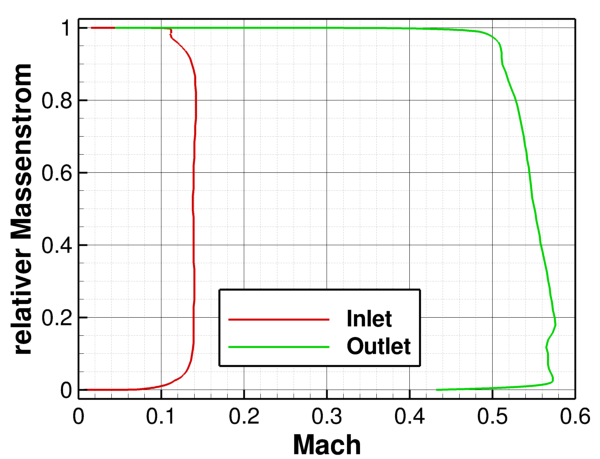
Example for radial distributions
Modifications
- Use 2D CGNS (Leave out
-rbc) POST \
--input TRACE2D.cgns \
--createBandedInterfaces \
--averaging \
--TurbomachineryAnalysis_0D1D
- Only 0D values (Leave out
--createBandedInterfaces) POST \
--input TRACE.cgns -rbc\
--averaging \
--TurbomachineryAnalysis_0D1D
- Radial distribution of entropy (Add arbitrary field calculation before
--averaging) POST \
--input TRACE.cgns -rbc\
--createBandedInterfaces \
--calcEntropyPost \
--averaging \
--TurbomachineryAnalysis_0D1D
- Append a user defined control domain for additional relation calculations (generate Xi-Cuts -> S3 cut, split up
--TurbomachineryAnalysis_0D1D and insert --addContorlDomain) POST \
--input TRACE.cgns -rbc\
--createBandedInterfaces \
--intersectPanel -gf S2m_grid_with_Xi.dat -cf Xi_Cuts.dat \
--averaging \
--buildTurbomachine \
--addControlDomain -name XI_0.1_0.8 \
-mainInlet IP_ISO_XI_CUT_0.010000 \
-mainOutlet IP_ISO_XI_CUT_0.080000 \
--globalTurbomachineryAnalysis \
--writeGta
Data Output Formats - Sub-options for TurbomachineryAnalysis_0D1D-task
- 2 possible output formats
- ALL formats are written always
- Default path
../output/POST
- Tecplot ASCII
- Sub-option
-tecplotASCII <folder>
- Separate files for dimensions (0D/1D), variable types (primitives/relations) and averaging types (flux/area/mass)
{dimension}_{variable type}_{averaging type}.dat- Dimensions:
0d, 1d_spanwise
- Variable types:
primitives, relations
- Averaging types:
flux, area, mass
- E.g.
d1_spanwise_relations_flux.dat, d0_primitives_area.dat
- Zone names: Blade rows/Block group, stages, component
- Global variable list: Variables invalid for a certain zone (e.g. stator) are set to -999.899
- Radial distributions: SpatialAveragingType might differ within a file (0 - flux, 1 - mass, 2 - area)
- JSON object
- Sub-option
-ulist <file_path>
- Single file for the complete data
- Available reader in MOJO (uList)
Initialization for TRACE
-wtbv/--writeTraceBdVal- Can be used in combination with glora task or separately
- Writes radial distributions for all entry/exit/interface panel families and all averaging types in Tecplot format which can be read by TRACE
POST \
--input TRACE.cgns -rbc \
--createBandedInterfaces \
--averaging \
--writeTraceBdVal -fileName <file_path>
- Sub-options:
-avgType
-bandCenterAsVertex
-panelFamily
-writeAllVars
- Conventions for file name:
- Either file name or format string can be provided, e.g.
bd_radial_%s_%s.dat
- Panel family name and averaging type are inserted
- Path can be specified
Thermally perfect gas
- Precondition
- Gas model set via GMC (thermochemistry tables necessary)
-
Multiple gases must be treated as gas composition
-
For the time being global constant composition mixture only
-
Thermochemical database: licensing and usage by third party to be clarified. In principle to be found in GMC previous definition of environmental variable. For time being not available to external users
-
Format: BURCAT, NASA, GRI
Set up Mole Fraction via PREP
- Gas settings required
- Use PREP task
setMoleFractions to write mole fractions provided by user to CGNS file in all blockgroups PREP -cgns TRACE.cgns -it <MoleFractionFile> --setMoleFraction
- Example
- Example of a mole fraction file
TITLE = ...
VARIABLES = "AR" "CO2" "N2" "O2"
ZONE T = "GasModel", I = 1, DATAPACKING = POINT
"AR" "CO2" "N2" "O2"
0.00934 0.000344 0.78084 0.209476
- Analysis with POST
POST \
--input TRACE.cgns -rbc -cc \
--createBandedInterfaces \
--averaging \
--TurbomachineryAnalysis_0D1D
Additional/modified tasks and sub-options
-cc: sub-option of input task (-i/--input) multicomponent gas is treated as a constant composition mixture
Use TRACE output
Overwrite averaging results with TRACE output:
- Use the task --readInterfaceFiles to replace POST results with TRACE output. Then a standard global turbomachinery analysis can be carried out. It is recommended, however, to use it in combination with the -cda flag for –TurbomachineryAnalysis_0D1D, since not all area and mass averaged values are available in TRACE. -cda makes sure that derived quantities are recomputed. A typical command line is:
POST \
--input TRACE.cgns -rbc \
--createBandedInterfaces \
--averaging \
--readInterfaceFiles -f ../output/residual/\*dat ../output/radial/d1\*av\*dat \
--TurbomachineryAnalysis_0D1D -cda -ulist ../output/gta.ulst -tecplotASCII ../output/gta
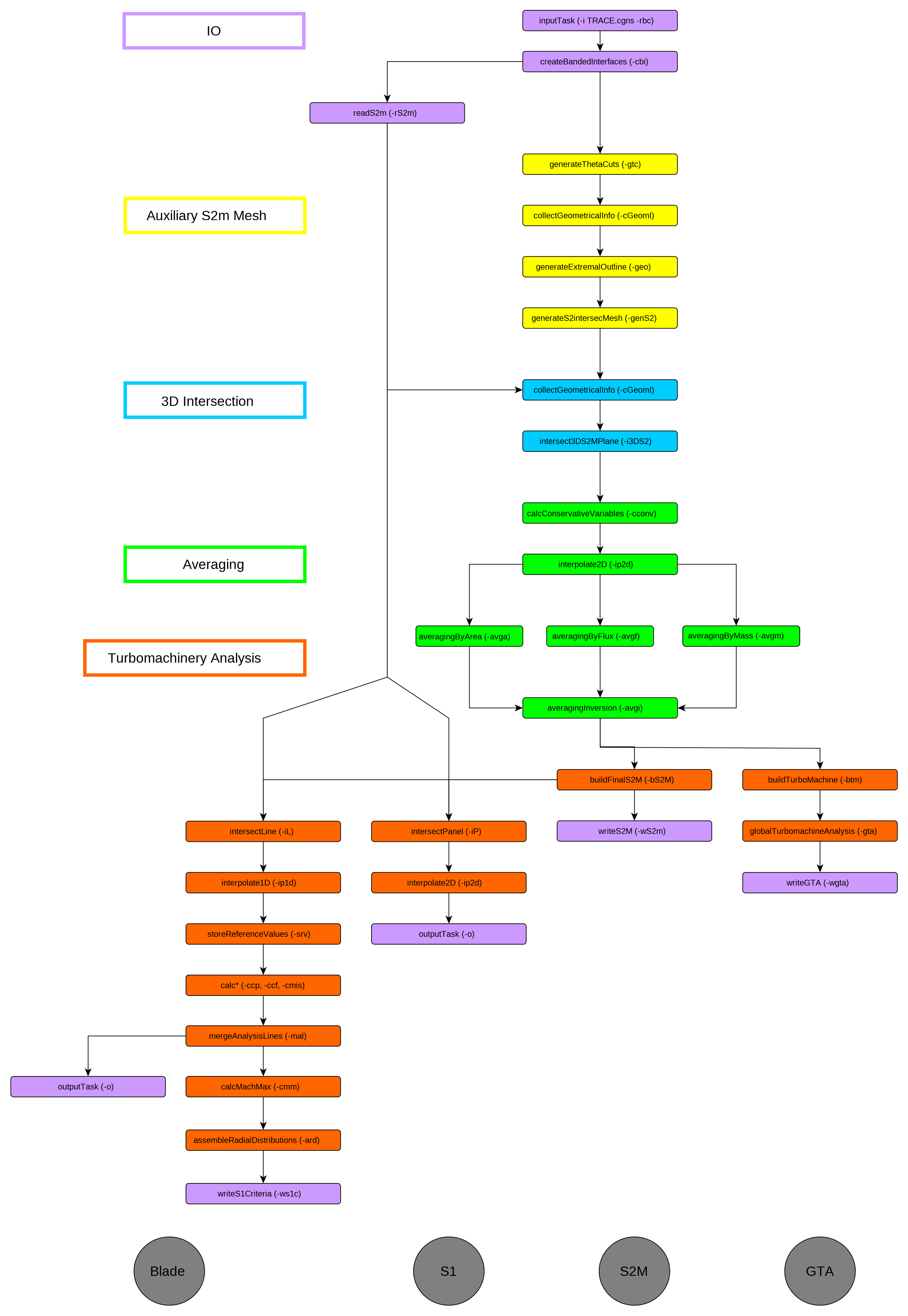
Involved tasks

 1.9.1