 |
TRACE User Guide
TRACE Version 9.8.1
|
A left-hand side matrix recomputation of a single block also triggers the recomputation of all other blocks. This command can only be set immediately and collectively for all blocks.
| ON | trigger left-hand side matrix recomputation collectively on all blocks |
| OFF | trigger left-hand side matrix recomputation separately on all blocks (default and recommended) |
Trigger communication of flow state and gradients prior to the corrector step. Only has an effect for the Predictor-Corrector solution method. This can improve convergence rate. This option can only be set collectively for all blocks.
| ON | activate communication prior to corrector step |
| OFF | deactivate communication prior to corrector step (default) |
Since TRACE 9.6 the linear solver library Spliss is used per default for solving the implicit linear systems. If the user wants to use the old legacy solver implementation instead, he can do so by specifying this command.
Define an time step based interval for the computation and output of global monitors, e.g. \(L_n\)-residuals and cfl number. Residual files are only written when the global monitors are computed. Moreover, this controls also the broadcast of the wall-clock time depending output and finalize.
Only available in combination with explicit time integration and non-linear solver.
| number-of-time-steps | Perform computation of overall monitors every <number-of-time-steps> time step. |
Prints the performance index (PID) onto the screen output. It is activated per default for LES and DG, but deactivated for all other modes. See Performance Index (PID) for the definition.
Prints estimated remain wall clock time on screen. This is naive estimate based on the maximum number of time steps.
Sets predefined values that are used by the MTU on a standard basis ImplicitSolverSweeps = 2 ImplicitSolverSweepCommunication ON
Calculations in MultiMode Model are performed with the calibrated functions, not with corrected functions
Use this control command to deactivate the check for failure, i.e. check for an unphysical flow state, and, thus, disable the output before a crash will occur. By deactivating this, the parallel performance of the solver might be approved.
Activate surge cycle control.
| Long option | Short option | Description |
|---|---|---|
--blockFamily | -bf | Block family containing nozzle. |
--controlFile | -cntl | Tecplot ASCII file containing the prescribed piecewise nozzle deformation. |
For the format specification of the control file see Piecewise Displacements
Define throttle control surface and massflow threshold.
| Long option | Short option | Description |
|---|---|---|
--panelFamily | -pf | Panel family to use as a control surface. |
--type | -t | Type of panel: either inflow or outflow. |
--threshold | -th | Mass flow threshold. |
Define release control surface and massflow threshold.
| Long option | Short option | Description |
|---|---|---|
--panelFamily | -pf | Panel family to use as a control surface. |
--type | -t | Type of panel: either inflow or outflow. |
--threshold | -th | Mass flow threshold. |
Write out a 3D field NumberFailedSolutions that shows how many times a cell had a failed solution update. For structured blocks, boundary cells also contain the number of failed solutions in ghost cells.
Set implicit solver method.
The default value when using SPLISS (default) is SGS_SOLVER for structured and unstructured blocks.
The default values when using the LegacyLinearSolver (see command UseLegacyLinearSolver) are ILU_SOLVER for structured and SGS_SOLVER for unstructured blocks.
This command sets the methods for both kinds of blocks.
Only available when using SPLISS (default):
ILU0_SOLVER using ILU(0) decomposition of sparse SolverMatrix.
ILU0_GMRES_SOLVER is a GMRES preconditioned by ILU0 decompositions. Optional positional parameters
SSOR_GMRES_SOLVER is a GMRES preconditioned by SSOR. Optional positional parameters:
Specifies the number of sweeps of the iterative solver that relaxes the linearized implicit system in non-linear or harmonic-balance solver mode. This command can only be set immediately and collectively for all blocks.
| nIterations | number of sweeps \(x \ge 1\) of the iterative linear solver (default: \(1\), recommended: \(\le 4\)) |
Trigger communication of sweep results along 1-to-1 connectivities inside the iterative solver that relaxes the linearized implicit system in non-linear solver mode. This can improve convergence significantly, though it tends to become unstable for a large number of sweeps. This option can only be set collectively for all blocks.
| ON | activate communication of sweep results |
| OFF | deactivate communication of sweep results (default) |
Set the basic mode in which TRACE runs.
| mode | solver mode, can be 'NON_LINEAR', 'HARMONIC_BALANCE' or 'TIME_LINEARIZED' |
immediate level.Set the spatial accuracy for block groups.
| order | Spatial accuracy (FV: 1stOrder to 2ndOrder, DG: 2ndOrder to 16thOrder). |
The left-hand side matrices are periodically recomputed for the predictor step at a specified interval. For steady simulations the time step interval is specified. For unsteady simulations the pseudo-time step interval is specified.
The LHS recomputation of a block is always triggered
LHS recomputations are reported for blocks with active message mode.
| interval | time step (steady) resp. pseudo-time step (unsteady) interval to trigger recomputation of the left-hand side, a value \(\le0\) disables this trigger (default: \(1\), recommended: \(\le 100\) for steady, \(0\) for unsteady (only recompute LHS at the beginning of a time step)) |
The left-hand side matrix recomputation at the predictor step is triggered by the block-local maximum residual monitoring function
\begin{equation*} ||Res_n||_\infty > {||Res_{n-1}||_\infty}^{\frac{1}{1+x}} \,. \end{equation*}
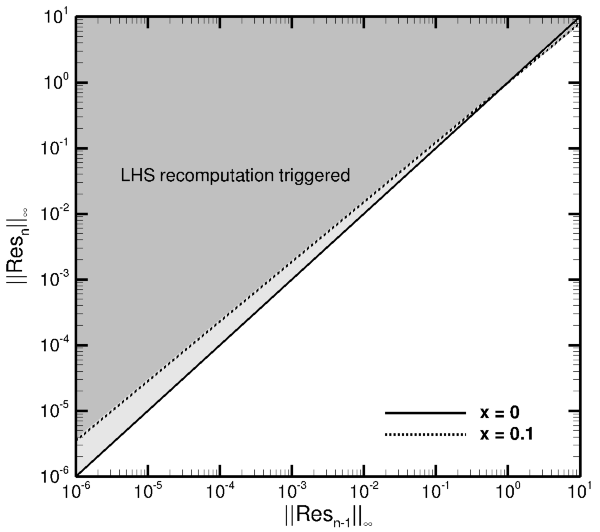
| threshold | threshold value \(x \ne -1\) in given block-local residual monitoring function (default: \(x = 0.\), recommended: \(0. \le x \le 0.1\)) |
The left-hand side matrix recomputation at the corrector step is triggered by the block-local maximum residual monitoring function
\begin{equation*} ||Res_{n+\frac{1}{2}}||_\infty \ge x \,. \end{equation*}
| threshold | threshold value \(x\) in given block-local residual monitoring function (inactive for \(x < 0\), always triggered for \(x = 0\), default: inactive) |
Stability of the implicit solver can be enhanced by under-relaxation of the implicit system by a relaxation factor \(\sigma\). For a generic scalar variable \(u\) with the residual function \(R(u)\) the relaxed pseudo-transient Newton's method in pseudo-time \(\tau\) is:
\begin{equation} \left(\frac{\sigma}{\Delta \tau} - \left.\frac{\partial R}{\partial u}\right|^n\right) \Delta u = R(u^n) \\ u^{n+1} = u^n + \sigma \Delta u \end{equation}
The pseudo-time derivative in the LHS is also scaled \(\sigma\) to sustain convergence rate at small CFL numbers. This scheme is applied to the flow (cf. Eqn. Eqn_IRK-Generic01) and transport variables. Over-relaxation ( \(\sigma > 1\)) is not recommended.
| factor | ( \(> 0\), default: \(1\)) |
 1.9.1